
AI assistants are good at writing a post. Until recently that is where they stopped: you copied the text, opened your scheduler and pasted it in. A social media MCP server removes that step. The assistant can schedule the post itself, on your accounts, when you ask it to.
Quick answer: what is a social media MCP server?
MCP (Model Context Protocol) is the open standard AI assistants use to connect to other apps. A social media MCP server gives an assistant a set of tools for social media, so it can act on your accounts instead of only writing text for you to copy. The Sociro MCP server is one: your assistant can list your brands and accounts, add an image, and schedule, publish, check, edit or cancel posts in Sociro.
What "agentic social media" means
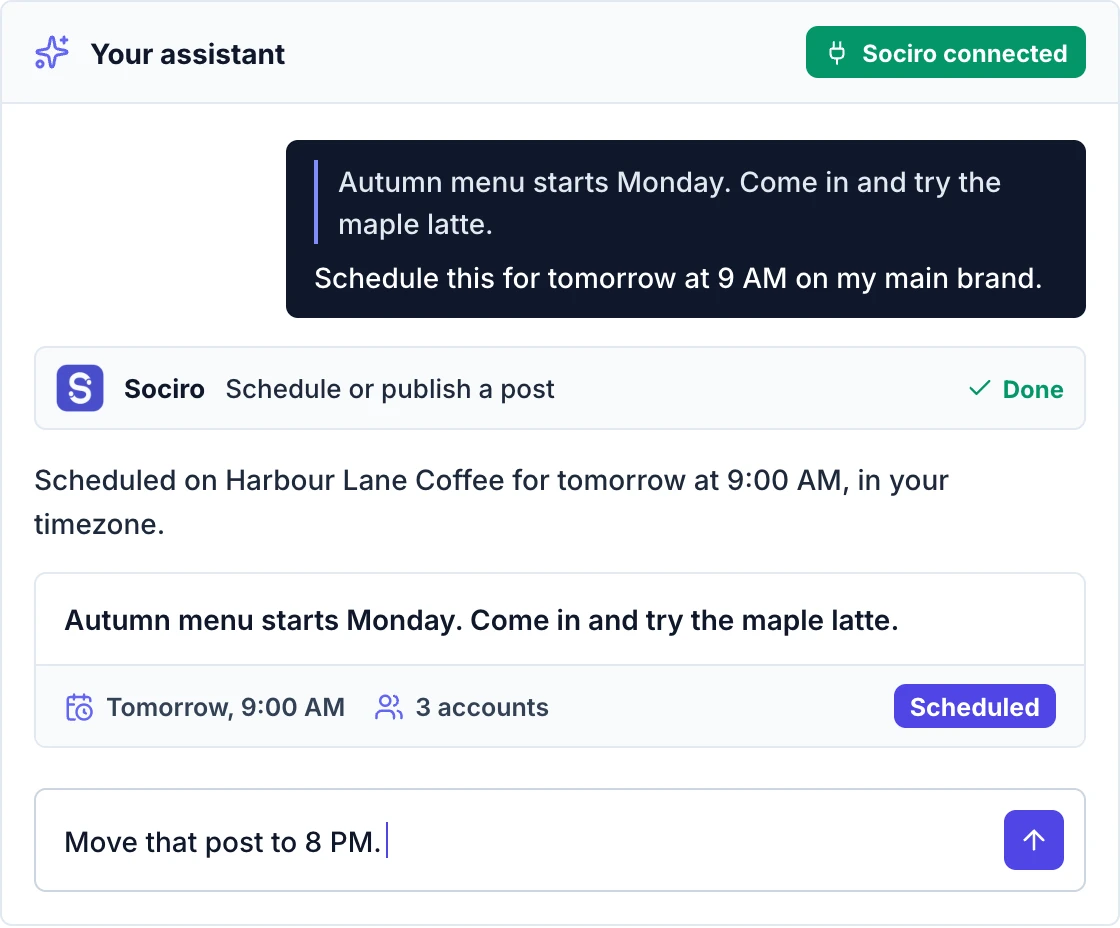
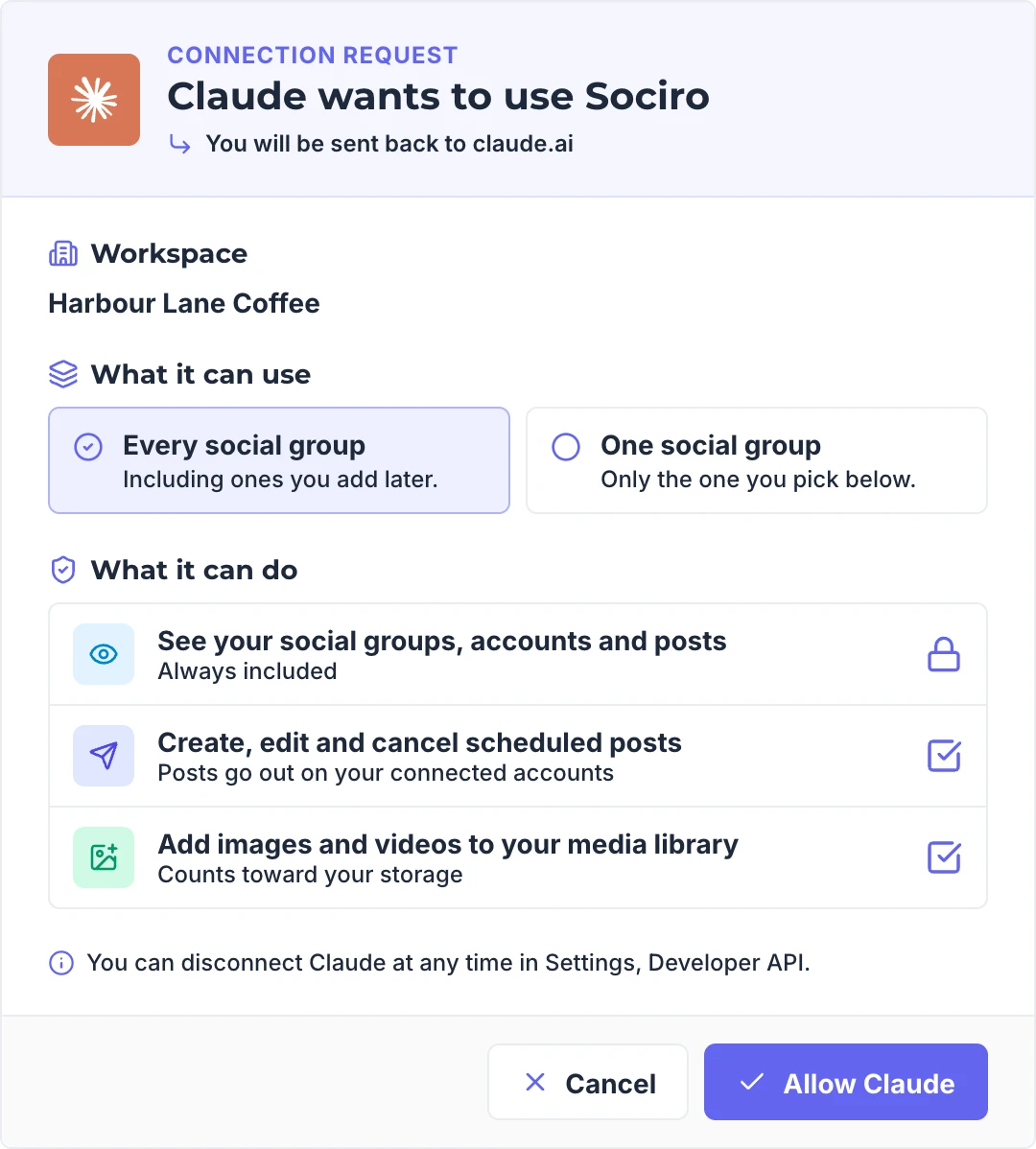
Agentic social media means an AI agent does the posting work, not only the writing. You say what you want in plain words, the agent picks the right tool and carries out the steps, and you stay in charge of what goes out. With Sociro the agent works inside limits you set when you sign in: which brands it can use, and whether it may read only, post, or add media.
How it works, step by step
- You add one address to your assistant. For Sociro it is
https://mcp.sociro.com/mcp. - You sign in and set the limits. You choose the workspace, the brands and what the assistant may do.
- You ask in plain words. The assistant picks the right tool, for example "schedule a post", and fills in the details from your message.
- The scheduler does the work. The post is created in Sociro and goes out at the time you gave, the same as a post you made by hand.
What an assistant can do with it
| What it does | In detail | Example |
|---|---|---|
| List social groups and their accounts | Shows every social group (brand) your connection can use and the accounts in each. | "Show my brands and their accounts." |
| Add an image from a link | Adds an image to your Sociro media library from a link, ready to post. | "Add this image to Sociro: https://example.com/picture.png" |
| Set a video's thumbnail | Sets or replaces the thumbnail of a video in your library. It can also be used as the cover on platforms that take one. | "Use this image as the thumbnail for that video." |
| Schedule or publish a post | Schedules a post for later or publishes it now, to one or more accounts of a brand. Supports a first comment, a video cover, and the title, description and privacy options some platforms need. | "Schedule this for tomorrow at 9 AM on my main brand." |
| Get one post | Shows a post's status on each account, its public links once published, and the reason if it failed. | "Did yesterday's post go out? Give me the links." |
| List posts | Lists your posts by status, date and brand. | "What is scheduled this week?" |
| Edit a scheduled post | Changes the caption or the time of a post that has not gone out yet. | "Move that post to 8 PM." |
| Cancel a scheduled post | Cancels a post that has not gone out yet. | "Cancel that post." |
MCP, an API or the app: which one is for you?
| Way | Best for | What you need |
|---|---|---|
| The Sociro app | Planning a calendar by hand, connecting accounts, everything visual | A browser |
| The MCP server | People who already work in an AI assistant and want to post without switching apps | An assistant that supports MCP connectors, and a sign-in |
| The Developer API | Developers building posting into their own software | An API key and code |
They are not rivals. The assistant works inside the limits of your plan and of what you allowed when you signed in. A common way to work is the app for setup and the assistant for day-to-day posting.
Is it safe to let an AI post for you?
It is as safe as the limits around it. With Sociro:
- Nothing is published by accident: a post needs a time, or a clear instruction to publish now
- No double posts: if the assistant repeats a request, the post that already exists is returned
- Your assistant asks before it posts, edits or cancels, when your app is set to ask for approval
- A connection can only do what you allowed when you signed in, or what your API key can do, and your plan's limits apply
- A sign-in is short-lived and renews itself. Only the workspace owner or an admin can approve one, and it stops if they leave the workspace
Connect your assistant
Pick your assistant and follow its guide. You sign in with your Sociro login, with no API key to copy.
Which assistants work with it?
Any assistant that supports MCP connectors can use the same address. There is a step-by-step guide for each of the popular ones: Claude, ChatGPT, Cursor, VS Code and Gemini CLI.
What it cannot do yet
- Attach a file in the chat on the web. Add an image by link instead, or use the local server
- Add a video from a link
- Browse the media library
- Use a different caption for each account in one request. The assistant sends one request per platform
- Change the media or the accounts of a post that is already scheduled. Cancel it and create it again
- Analytics, drafts and approvals, comments and replies, and the AI Planner
- Connect or disconnect social accounts. That is done in the Sociro app
Frequently asked questions
Is an MCP server the same as an API?
No. An API is for developers who write code. An MCP server is what an AI assistant uses: it describes its tools in a way the assistant understands, so you can ask in plain words instead of writing code.
Is this an AI social media scheduler?
Sociro is the scheduler. The MCP server lets the AI assistant you already use schedule and publish through it, so you can plan a post in a chat and have it go out on your connected accounts at the time you ask for.
Can I use it with my own AI agent or workflow?
Yes. An agent or workflow that supports MCP connects to the same address, by signing in or with an API key in a request header, and gets the same tools as an assistant.
Does the assistant see my passwords for social platforms?
No. Your social accounts are connected inside Sociro. The assistant only talks to Sociro, inside the limits you set when you signed in.