
As artificial intelligence tools like Midjourney, Stable Diffusion, DALL-E 3, and Adobe Firefly become standard instruments for designers and marketers, understanding image metadata has become vital. Every AI-generated image file carries hidden data blocks written directly into its file container. These header chunks often include your exact text prompts, negative prompts, seed values, model hashes, camera metadata, and C2PA content authenticity signatures.
Whether you want to safeguard your proprietary prompt engineering, prevent accidental exposure of private client briefs, or clean your images before publishing to websites and social media, this guide explains how AI image metadata works and how to strip it cleanly.
What is Embedded AI Image Metadata?
When you create an image using AI software, the generation engine encodes technical details alongside the visual pixel grid. This information is saved in standard image header structures, primarily:
- PNG Text Chunks (tEXt, zTXt, iTXt): Used extensively by Stable Diffusion (AUTOMATIC1111, ComfyUI, InvokeAI) to store key-value pairs like
parameters,prompt,negative_prompt,steps,sampler,CFG scale, andseed. - EXIF & XMP Metadata: Standardized camera and software metadata fields used by DALL-E 3, Adobe Firefly, and Midjourney to embed values such as
Software: DALL-E 3, timestamps, copyright notices, and software descriptors. - C2PA & Content Credentials: Cryptographic provenance manifests standardized by the Coalition for Content Provenance and Authenticity (supported by Adobe, OpenAI, Microsoft, and Google). These signatures record tool provenance, edit history, and AI origin.
Why You Should Remove AI Prompts & Metadata
1. Protect Proprietary Prompt Engineering
Crafting high-quality, reproducible AI artwork requires hours of prompt testing, parameter tuning, and seed exploration. If you publish an un-cleansed PNG image on your portfolio, client website, or social media feed, anyone can download the file, inspect the parameters chunk using a basic metadata viewer or text editor, and copy your exact prompt and model settings.
2. Prevent Exposure of Private Information
Prompts often contain confidential context, such as unreleased brand names, client names, internal project code names, or personal descriptive details. Stripping metadata prevents accidental leaks of sensitive business information.
3. Reduce File Size & Loading Times
Extensive generation metadata, especially complex ComfyUI node graphs, can add several kilobytes or even megabytes of text data to a single image file. Removing extraneous metadata reduces total file size, speeding up page load times for better web performance and SEO.
Step-by-Step: How to Remove Metadata from AI Images
Method 1: Use Sociro's Free AI Metadata Remover Tool
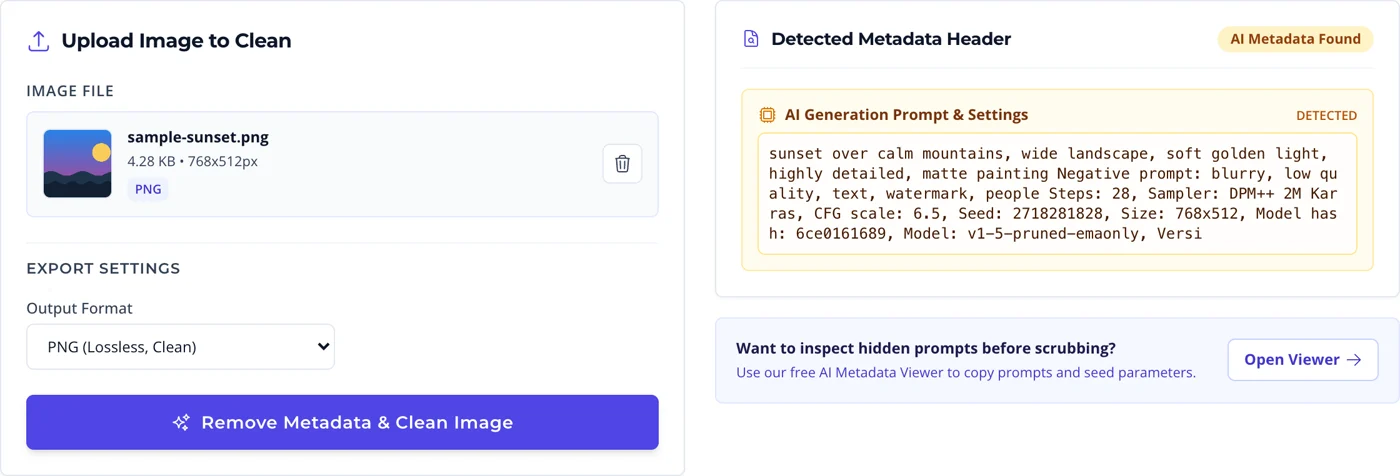
The fastest and most reliable way to clean AI image headers without software installation is using our browser-based AI Metadata Remover Tool:
- Upload your AI-generated image (PNG, JPEG, or WebP).
- Inspect the detected metadata header card to view any hidden prompts, seed numbers, or software tags.
- Select your preferred clean export format (PNG, JPEG, or WebP).
- Click Remove Metadata & Clean Image to re-encode the image buffer into a 100% fresh, metadata-free file.
- Download your clean, privacy-protected image file.
Clean an image right now
Strip prompts, seeds, EXIF and C2PA in one click. Processing happens in your browser, so the original never leaves your device.
Method 2: Why Renaming, Cropping and Screenshotting Are Not Enough
The most common mistakes people make when trying to clean an image by hand:
- Renaming the file does nothing. The filename is not metadata. Every prompt, seed and manifest sits inside the file body and survives the rename untouched.
- Cropping or resizing in most editors preserves metadata. Editors are built to carry EXIF, copyright and XMP through an edit on purpose. Many will faithfully copy the prompt chunk into the new file.
- Screenshotting works, but it costs you. It does destroy every embedded field, and it also downgrades you to screen resolution, re-compresses the image, and stamps it with your own device metadata instead.
- Converting to JPEG is only a partial fix. PNG text chunks are dropped, so the Stable Diffusion prompt goes, but EXIF, XMP, IPTC and C2PA carry straight over into the JPEG.
Reliable cleaning means re-encoding from raw pixel data at full resolution and writing a fresh file with no header blocks at all. That is exactly what the AI Metadata Remover does, without the quality loss a screenshot forces on you.
Platform Comparison: How Social Media Handles Image Metadata
Different social platforms handle image metadata in distinct ways when you publish content:
| Platform | Metadata Handling | C2PA / AI Labeling |
|---|---|---|
| Instagram & Facebook | Strips standard EXIF text chunks during upload compression. | Scans files for C2PA headers and automatically attaches an "AI Info" tag. |
| X (Twitter) | Strips most EXIF data, but retains basic fields on original file links. | Does not currently alter raw header manifests on downloadable media. |
| Re-encodes images upon upload, discarding standard PNG text chunks. | Scans manifests to identify AI origin for transparency labeling. | |
| Self-Hosted Websites / Blogs | Preserves 100% of image metadata unless stripped prior to upload. | Retains full prompt text and seed details exposed to site visitors. |
Best Practices for Managing AI Content Privacy
- Batch Clean Before Publishing: Establish a routine of scrubbing metadata from all generated assets before uploading to your CMS, media library, or client deliverables.
- Choose the Right Format: Exporting to PNG provides lossless visual fidelity without metadata, while WebP provides ultra-compact file sizes ideal for web performance.
- Combine with Social Media Automation: Use tools like Sociro to manage your content calendar, attach accessible alt text via our Alt Text Generator, and schedule clean posts seamlessly across all major platforms.
Conclusion
AI generation tools offer unprecedented creative power, but they also introduce new privacy and IP considerations. By inspecting and removing hidden prompts, seed numbers, and EXIF tags from your images, you retain full ownership of your creative workflows while delivering clean, optimized media across the web.
Clean images, published on autopilot
Strip metadata with the free AI Metadata Remover, then schedule the finished post across 11+ platforms from a single Sociro calendar.
Create your free Sociro account Explore features
Free plan available. No card required.